A hands-on lab deploying VNets, peering them securely, provisioning Windows Server VMs, and validating connectivity with Network Watcher.
A solid network foundation sits at the core of every reliable Azure environment. Whether you are deploying virtual machines, web applications, storage accounts, or container platforms, everything depends on a well-designed and well-validated network layer.
While the Azure Portal is extremely useful for learning concepts and visualizing resources, real confidence in Azure networking comes from automation, repeatability, and verification. In production environments, engineers are expected to deploy networks consistently, avoid IP conflicts, secure traffic paths, and prove that connectivity works as designed, not just assume it does.
In this hands-on lab, we build a complete Azure networking environment from scratch using PowerShell. The lab covers:
-
Virtual Network (VNet) design
-
Subnet allocation and IP planning
-
Windows Server virtual machine provisioning
-
Azure VNet peering
-
Connectivity validation using Azure Network Watcher
This walkthrough mirrors how Azure networking is designed, deployed, and validated in real production environments, not just in demos or tutorials.
🎥 Video Walkthrough
What This Lab Teaches (And Why It’s Practical)
This is not a theoretical overview of Azure networking. Every step reflects how infrastructure teams actually work:
-
Infrastructure is deployed programmatically
-
Networks are planned before creation
-
Peering is configured securely
-
Connectivity is validated using diagnostic tooling
By the end of this guide, you will understand not just how to deploy Azure networks, but why each step matters.
If you are still early in your Azure journey, this lab builds on the fundamentals introduced in Setting Up Clean Azure VNets, Subnets & Tagging and shows how those concepts translate into automation and troubleshooting.
Lab Objectives
By the end of this lab, you will be able to:
-
Provision Azure networking resources using PowerShell
-
Deploy multiple VNets with non-overlapping IP ranges
-
Create and peer VNets securely
-
Provision Windows Server virtual machines
-
Validate VM-to-VM connectivity using Network Watcher
Lab Environment Overview
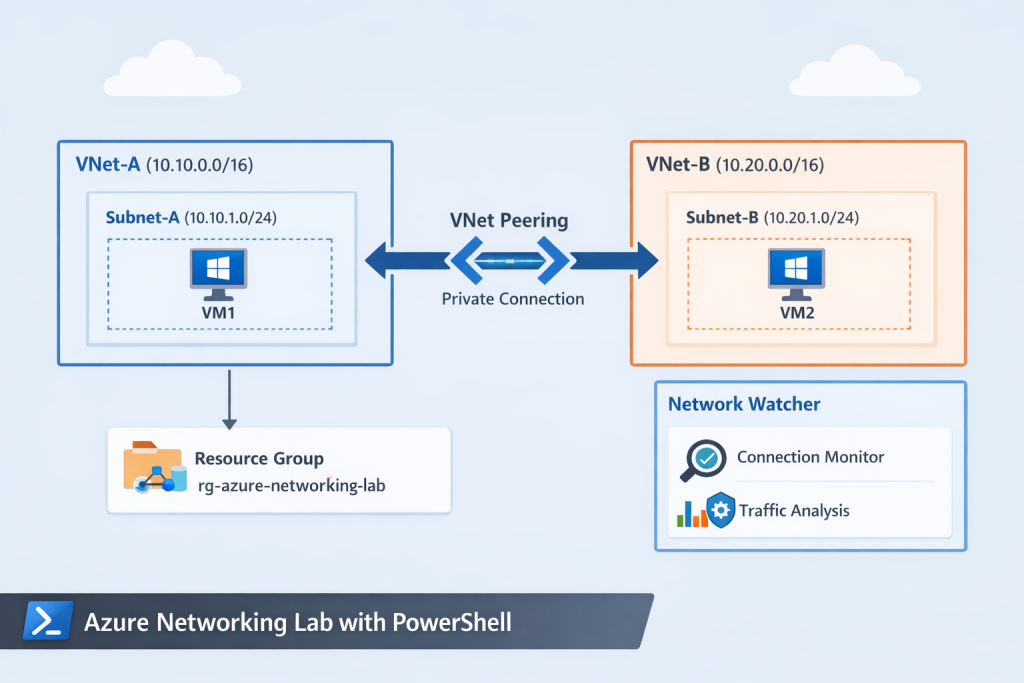
The lab environment is intentionally simple but realistic.
Resources Used
-
One Azure subscription
-
One resource group
-
Two virtual networks (separate address spaces)
-
One subnet per VNet
-
Two Windows Server virtual machines
-
Bi-directional VNet peering
-
Azure Network Watcher enabled
This design mirrors a common enterprise pattern: isolated networks with controlled private connectivity.
Create a Resource Group
A dedicated resource group keeps networking and compute resources organized, manageable, and easy to clean up.
In real environments, resource groups also enable:
-
Role-based access control (RBAC)
-
Cost tracking and budgeting
-
Consistent lifecycle management
These concepts are expanded further in Azure Policy, Tags, and Resource Locks Explained: A Complete Governance Guide for Cloud Engineers, which builds directly on this foundation.
PowerShell Command
# Sign in to Azure (run once per session)
Connect-AzAccount

# Create a resource group
New-AzResourceGroup `
-Name "rg-azure-networking-lab" `
-Location "East US"
Using PowerShell here establishes the pattern for the rest of the lab: automation first, portal second.
Design Virtual Networks and Subnets
Before creating anything in Azure, proper IP planning is critical. Poor address design leads to:
-
Overlapping IP ranges
-
Failed peering connections
-
Complex future migrations
Example Design
-
VNet-A:
10.10.0.0/16 -
VNet-B:
10.20.0.0/16
Each VNet contains a single subnet dedicated to virtual machine workloads.
This design ensures:
-
No IP overlap
-
Clean separation between environments
-
Compatibility with VNet peering
💡 In production, this same design approach scales to hub-and-spoke architectures and hybrid networking.
Provision Windows Server Virtual Machines
A Windows Server virtual machine is deployed into each VNet using PowerShell. Each VM is connected to its respective subnet through a correctly configured network interface (NIC).
This mirrors how infrastructure teams deploy compute resources at scale:
-
Networks are created first
-
Subnets are assigned deliberately
-
NICs are explicitly bound to subnets
Relying on automation instead of portal clicks reduces configuration drift and human error.
If you want to take VM standardization further, this lab pairs naturally with Building Golden Images with Azure Compute Gallery: Custom VM Image Creation & Deployment.
Configure Azure VNet Peering
Azure VNets are isolated by default even within the same subscription. Peering must be explicitly configured to allow private communication.
In this lab, VNet peering is configured to:
-
Enable private IP communication between VNets
-
Use Microsoft’s global backbone network
-
Avoid exposure to the public internet
Why Bi-Directional Peering Matters
VNet peering must be created in both directions to allow full two-way communication. Forgetting this step is a common beginner mistake and often leads to confusing connectivity failures.
Once peered, resources in both VNets can communicate as if they were on the same network without requiring VPN gateways or public IPs
Validate Connectivity with Azure Network Watcher
Deploying infrastructure is only half the job. Verification is what separates learning labs from production-ready work.
Azure Network Watcher is used to validate the network configuration by:
-
Simulating VM-to-VM communication
-
Testing RDP connectivity on port 3389
-
Identifying routing or Network Security Group (NSG) issues
This confirms that the environment works as designed, not just that resources exist.
Monitoring and alerting concepts introduced here are expanded further in How to Set Up Azure Monitor Alerts, Action Groups, and Processing Rules (Step-by-Step Guide).
Why Azure Network Watcher Matters in Production
Network Watcher provides critical visibility into:
-
Connectivity and reachability issues
-
Effective routing paths
-
NSG and firewall misconfigurations
Many production outages are caused not by failed deployments, but by silent misconfigurations. Using Network Watcher early helps detect these issues before they impact users or workloads.
Common Mistakes This Lab Helps You Avoid
-
Overlapping VNet address spaces
-
Forgetting bi-directional peering
-
Assuming connectivity without validation
-
Relying solely on portal deployment
-
Skipping diagnostic tooling
Avoiding these mistakes early builds long-term confidence.
How This Lab Fits Into Secure Azure Architectures
This lab focuses on private networking fundamentals. From here, you can extend the design to include:
-
Network Security Groups (NSGs)
-
Private endpoints
-
Storage network isolation
These concepts are explored in depth in Build a Secure Azure Environment in Minutes with Bicep: VMs, Networking, Private Endpoints & Blob Replication and Securing Azure Blob Storage with PowerShell: Network Isolation, SAS Access & Immutable Policies.
PowerShell vs Bicep: What’s Next?
PowerShell is excellent for learning, scripting, and operational tasks. As environments grow, Infrastructure as Code becomes essential.
The next natural step after this lab is transitioning to declarative deployments using Automating Azure Infrastructure with Bicep: A Hands-On IaC Lab Using VS Code.
Understanding both approaches makes you far more effective as an Azure engineer.
Key Takeaway
Strong Azure networking skills go beyond creating resources.
Real confidence comes from:
-
Automating deployments with PowerShell
-
Designing clean, scalable network layouts
-
Configuring secure private connectivity
-
Validating traffic flows using Network Watcher
This lab bridges the gap between beginner Azure knowledge and production-ready networking skills.
Where to Go Next
Once you’re comfortable with PowerShell-based networking, the next step is learning how to:
-
Enforce standards with Azure Policy
-
Monitor traffic and failures proactively
-
Secure networked services with private endpoints
-
Transition from scripts to Infrastructure as Code (Bicep/Terraform)
Discover more from Humble Cloud Tech
Subscribe to get the latest posts sent to your email.