Terraform on Azure: Building a Real-World Infrastructure from Scratch.
Terraform is not just another automation tool. In modern Azure environments, it is a core operational skill used by cloud engineers, DevOps engineers, and platform teams to build, manage, and scale infrastructure safely.
This guide takes you beyond a simple lab. Instead of only showing what to deploy, it explains why each component exists, how Terraform interacts with Azure, and how this approach mirrors real production workflows.
If your goal is to work professionally with Azure and Infrastructure as Code, this is the foundation you must understand.
Why Terraform Matters for Azure Engineers
Infrastructure as Code (IaC) is the practice of defining infrastructure using machine-readable configuration files instead of manual steps in the Azure Portal.
In traditional environments, infrastructure is created by clicking through interfaces. This approach does not scale, is difficult to audit, and often leads to configuration drift. IaC solves this by allowing infrastructure to be:
-
Version-controlled
-
Peer-reviewed
-
Reproducible
-
Automated
Terraform is one of the most widely adopted IaC tools because it uses a declarative model. You describe the desired end state, and Terraform determines how to reach it.
Key characteristics that make Terraform valuable in Azure environments:
-
Cloud-agnostic: Terraform works across Azure, AWS, GCP, and more
-
Declarative syntax: You define what you want, not how to build it
-
State-aware: Terraform tracks deployed resources to prevent duplication or drift
In real Azure jobs, Terraform is commonly used to:
-
Provision identical infrastructure across dev, test, and production
-
Reduce manual errors
-
Detect and correct configuration drift
-
Enable safe automation through CI/CD pipelines
This lab is intentionally hands-on and explicit. There are no shortcuts, no portal clicks, and no hidden abstractions. The workflow mirrors how infrastructure is deployed in professional environments.
Sources
-
HashiCorp Terraform Overview: https://developer.hashicorp.com/terraform/intro
-
Microsoft Terraform on Azure: https://learn.microsoft.com/azure/developer/terraform/overview
Understanding Terraform Before Writing Code
Before diving into configuration files, it’s important to understand how Terraform actually works.
Declarative vs Imperative Infrastructure
With Terraform, you do not write scripts that say “Create this resource, then that resource.”
Instead, you define the desired outcome, and Terraform computes the execution plan.
Terraform compares:
-
What exists in Azure
-
What exists in the Terraform state file
-
What is defined in your configuration
From this comparison, Terraform determines what must be created, updated, or destroyed.
Terraform State (Why It Matters)
Terraform stores resource metadata in a state file. This file allows Terraform to:
-
Track existing resources
-
Detect drift
-
Avoid recreating infrastructure unnecessarily
In production, state is usually stored remotely (for example, in Azure Storage). In this lab, local state is sufficient and aligns with beginner workflows.
Architecture Overview
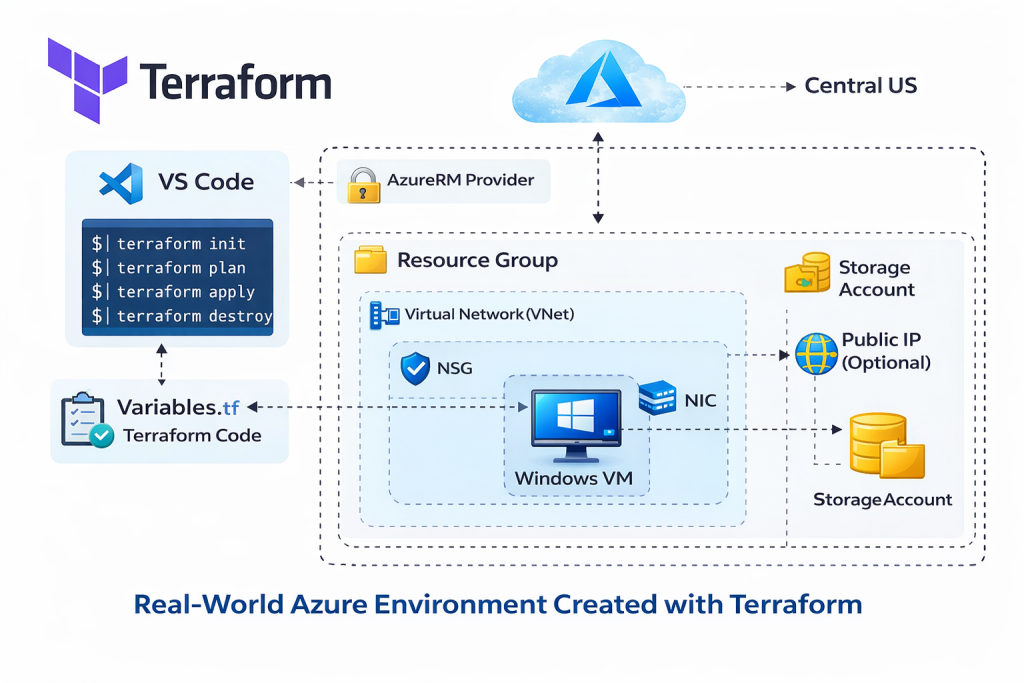
Lab Overview: What We’re Building
In this lab, we build a complete Azure infrastructure stack using Terraform that reflects a realistic production layout.
Environment Components Explained
Each component exists for a specific operational reason:
-
Resource Group
A logical container used to manage lifecycle, access control, and billing. -
Virtual Network (VNet)
Defines a private network boundary for Azure resources. -
Subnet
Segments the VNet to isolate workloads and apply network policies. -
Network Security Group (NSG)
Controls inbound and outbound traffic using security rules. -
Network Interface (NIC)
Connects the virtual machine to the subnet and NSG. -
Windows Virtual Machine
Represents the compute workload. -
AzureRM Provider
Enables Terraform to communicate with Azure Resource Manager APIs.
This structure aligns with Microsoft’s recommended Azure resource hierarchy and networking model.
Source
-
Azure resource hierarchy: https://learn.microsoft.com/azure/cloud-adoption-framework/ready/azure-best-practices/resource-naming
Prerequisites
Before starting, ensure the following are installed and configured:
-
An active Azure subscription
-
Visual Studio Code (for writing Terraform code)
-
Terraform CLI
-
Azure CLI
Terraform uses the Azure CLI for authentication when running locally. This is the recommended approach for development and learning environments.
After installing Azure CLI, authentication is handled via:
az loginTerraform then automatically uses the authenticated Azure context.
Sources
-
Terraform installation: https://developer.hashicorp.com/terraform/install
-
Azure CLI installation: https://learn.microsoft.com/cli/azure/install-azure-cli
 Video Walkthrough
Using Variables for Secure and Reusable Code
Hardcoding values directly into Terraform files is discouraged in real environments.
Instead, Terraform separates configuration logic from environment-specific values.
variables.tf
This file defines inputs such as:
-
Location
-
VM name
-
Admin username
-
VM size
Each variable includes a type and description, making the configuration self-documenting.
terraform.tfvars
This file stores actual values for a specific environment.
For example:
-
Development VM size
-
Region
-
Naming conventions
This separation allows the same Terraform codebase to be reused across multiple environments without modification.
Why Variables Matter in Production
Using variables helps to:
-
Improve security by avoiding hardcoded credentials
-
Enable reuse across environments
-
Simplify long-term maintenance
-
Support automation and CI/CD pipelines
This approach follows Terraform’s official best practices.
Source
-
Terraform variables: https://developer.hashicorp.com/terraform/language/values/variables
Terraform Lifecycle Commands Explained
Terraform follows a clear and predictable lifecycle.
terraform init
Initializes the working directory and downloads required providers.
This step must be run before any other command.
terraform plan
Generates an execution plan showing exactly what Terraform will change.
This step is critical in production environments to prevent accidental changes.
terraform apply
Applies the planned changes and deploys infrastructure to Azure.
Terraform will prompt for confirmation unless auto-approved.
terraform destroy
Safely removes all resources managed by Terraform.
This ensures clean teardown without leaving orphaned resources.
These commands are intentionally designed to encourage safe and auditable infrastructure changes.
Source
-
Terraform CLI workflow: https://developer.hashicorp.com/terraform/cli
How Terraform Interacts with Azure (Conceptual Flow)
Understanding the execution flow helps prevent confusion and errors:
-
Terraform CLI reads configuration files
-
Provider authenticates via Azure CLI
-
Terraform queries Azure Resource Manager
-
A plan is generated by comparing state and configuration
-
Approved changes are applied
-
State file is updated
This flow ensures Terraform always knows what exists and what it controls.
Common Troubleshooting Scenarios
Even simple labs surface real-world issues. Common problems include:
-
Authentication failures (Azure CLI not logged in)
-
Region-specific VM SKU availability
-
NSG rules blocking connectivity
-
Resource name conflicts
-
State file inconsistencies
When issues occur:
-
Always review
terraform plan -
Read error messages carefully
-
Avoid manually changing resources created by Terraform
Terraform errors are usually descriptive and actionable.
Introduction to Modularization (Best Practice)
As environments grow, a single main.tf file becomes difficult to manage.
In production, infrastructure is often split into modules:
-
Network module (VNet, subnets, NSGs)
-
Compute module (VMs)
-
Shared variables and outputs
Modules enable:
-
Reuse across projects
-
Cleaner code organization
-
Team collaboration
For learning purposes, a single configuration file is appropriate.
As complexity grows, modularization becomes essential.
Lab Validation and Cleanup
Validation
After deployment:
-
Verify resources in the Azure Portal
-
Confirm VM provisioning and networking
-
Validate NSG rule behavior
This confirms Terraform deployed infrastructure as expected.
Cleanup
Always destroy lab resources when finished to avoid unnecessary costs.
Terraform ensures that only resources it created are removed, protecting unrelated infrastructure.
Source
-
Azure cost management basics: https://learn.microsoft.com/azure/cost-management-billing
Final Thoughts
This guide demonstrates how real Azure infrastructure is built using Terraform, not just how to run commands.
Once you understand:
-
Declarative infrastructure
-
State management
-
Safe deployment workflows
You can confidently scale this knowledge into production, automation pipelines, and enterprise environments.
Discover more from Humble Cloud Tech
Subscribe to get the latest posts sent to your email.