
Modern businesses rely on technology to operate, scale, and compete. Traditionally, this meant running physical data centers filled with servers, networking equipment, and storage systems. While this on-premises approach offers control, it also introduces high upfront costs, ongoing maintenance, and limited flexibility.
Cloud computing emerged as a response to these limitations. Instead of buying infrastructure that may sit idle for months, organizations can access computing resources on demand and scale them instantly based on real business needs.
This guide explains cloud computing from first principles, connects theory to real-world architectures, and shows how platforms like Microsoft Azure fit into the modern cloud ecosystem.
What Is Cloud Computing?
Cloud computing is the on-demand delivery of IT resources such as servers, storage, databases, networking, software, and analytics over the internet using a pay-as-you-go pricing model.
Rather than owning physical hardware, organizations rent resources from cloud providers and consume them as operational services. This model shifts IT from a capital-heavy investment to a flexible operational expense.
In simple terms:
Cloud computing allows you to use computing power from remote data centers through the internet, without managing the physical hardware yourself.
These data centers are operated and maintained by global providers such as:
-
Microsoft Azure
-
Amazon Web Services (AWS)
-
Google Cloud Platform (GCP)
-
IBM Cloud
-
Oracle Cloud
Most cloud workloads run on Linux under the hood. Virtual machines, containers, Kubernetes nodes, and CI/CD runners all rely heavily on Linux operating systems. If you want to understand how cloud platforms actually work in production, Linux fundamentals are essential.
To learn how Linux is used in real cloud and DevOps environments, see:
👉 Linux in Cloud, DevOps & Production: How Linux Powers Modern Infrastructure
Why Cloud Computing Was Created
Consider a company that runs a large annual event. For a few weeks each year, it needs significantly more computing power to handle registrations, payments, and analytics.
Traditionally, organizations ran their own on-premises data centers. These facilities contained:
-
Physical servers
-
Network switches and routers
-
Storage devices
-
Cooling and power infrastructure
While this model works, it introduces major limitations.
The On-Premises Problem
Organizations must:
-
Buy hardware upfront
-
Maintain and replace equipment
-
Plan capacity years in advance
-
Pay for infrastructure even when it sits idle
Imagine a business that hosts a large annual event. For a short period, it needs extra computing power to handle traffic, registrations, and analytics. With on-premises infrastructure, the company must purchase servers that will be underutilized for the rest of the year.
This leads to:
-
High capital costs
-
Wasted resources
-
Limited agility
Cloud computing was designed to solve these exact problems.
Cloud Deployment Models (Where the Cloud Runs)
Cloud environments are classified by how and where they are hosted.
Private Cloud
A private cloud is used exclusively by a single organization. It may be hosted in an internal data center or managed by a third party.
Key characteristics:
-
Full control over infrastructure
-
High capital expenditure (CapEx)
-
Often used for strict compliance or regulatory requirements
Public Cloud
A public cloud is owned and operated by a cloud service provider such as Microsoft Azure, AWS, or Google Cloud.
Key characteristics:
-
Shared infrastructure, securely isolated
-
Pay-as-you-go pricing
-
Rapid provisioning and global scale
Public cloud platforms are the foundation of most modern startups and enterprises.
Hybrid Cloud
A hybrid cloud combines private and public environments.
Organizations often:
-
Keep sensitive systems on premises
-
Run scalable workloads in the public cloud
Community and Multi-Cloud (Honourable Mentions)
-
Community cloud: Shared by organizations with similar requirements (e.g., healthcare, government)
-
Multi-cloud: Using multiple cloud providers for different workloads
Cloud Service Models (What the Cloud Provides)
Cloud services are categorized by how much responsibility is handled by the provider versus the customer.
Infrastructure as a Service (IaaS)
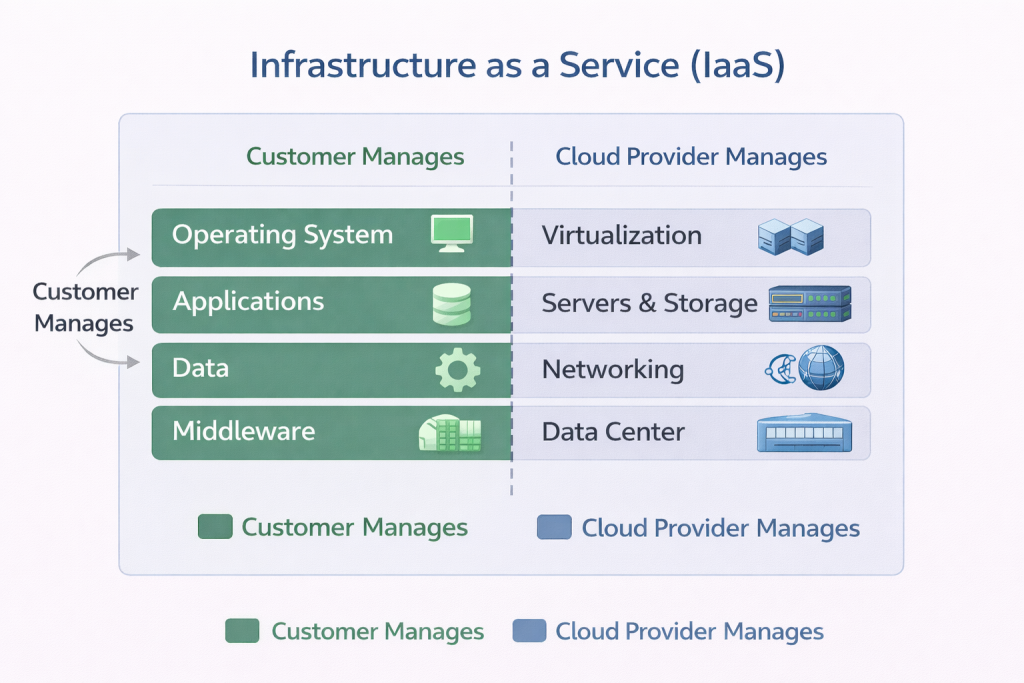
IaaS provides virtualized computing resources such as:
-
Virtual machines
-
Storage
-
Networking
The customer manages:
-
Operating systems
-
Applications
-
Data
The provider manages the physical infrastructure.
Example: Azure Virtual Machines
Platform as a Service (PaaS)
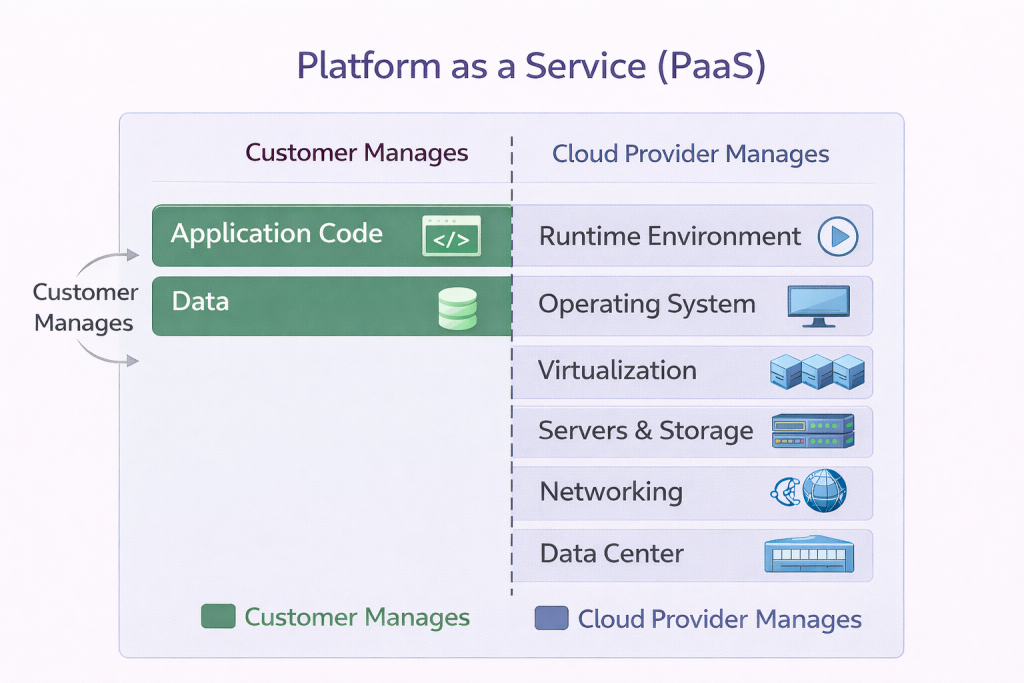
PaaS removes the need to manage operating systems and infrastructure.
The customer focuses on:
-
Application code
-
Data
The provider manages:
-
OS
-
Runtime
-
Scaling
Example: Azure App Service
Software as a Service (SaaS)
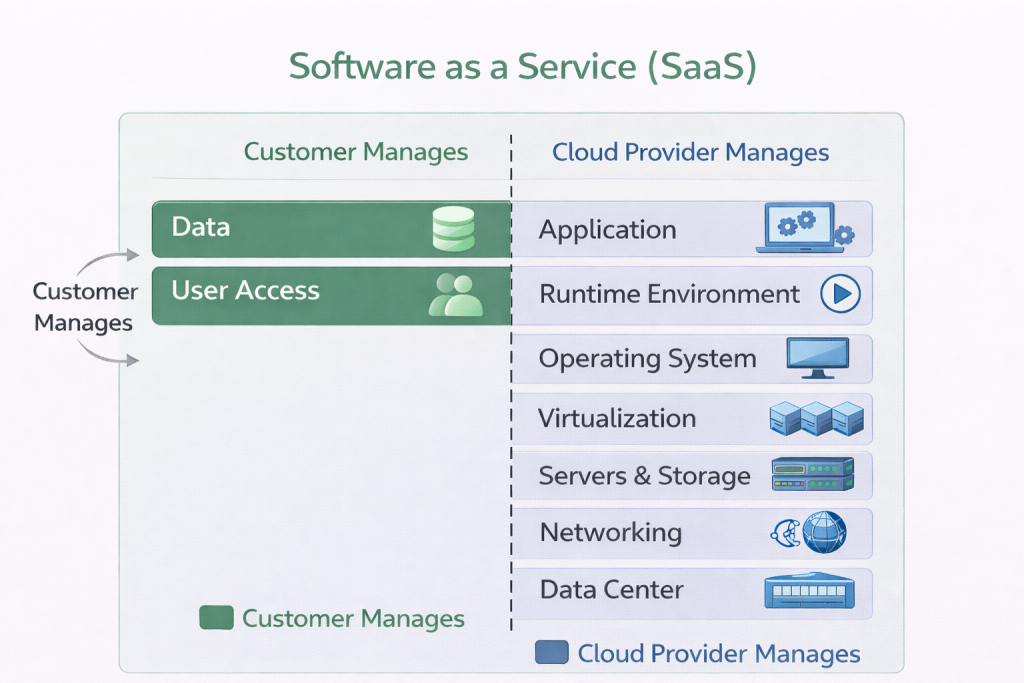
SaaS delivers complete applications over the internet.
The customer manages:
-
Data
-
User access
The provider manages everything else.
Example: Microsoft 365, Salesforce
The Shared Responsibility Model (Critical for Security)
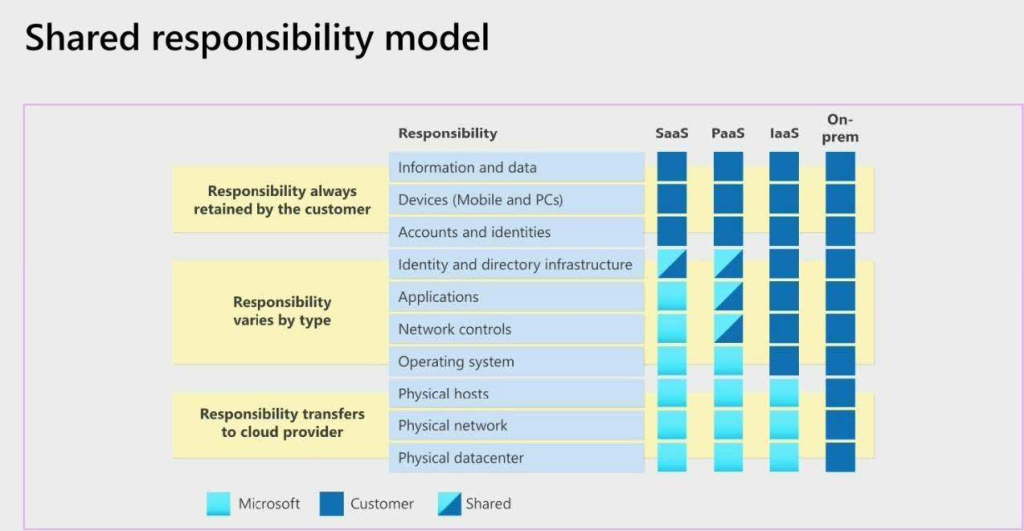
A common misconception is that “the cloud is fully secure by default.” In reality, security is shared.
According to the shared responsibility model:
-
The cloud provider secures the cloud
-
The customer secures what’s in the cloud
For example:
-
In IaaS, customers secure the OS and applications
-
In SaaS, customers mainly secure data and user access
Core Cloud Principles: Cost, Scaling, and Availability
Cost Model: CapEx vs OpEx
Cloud computing replaces large capital investments with operational expenses. Instead of buying hardware, organizations pay for consumption.
Scalability and Elasticity
-
Vertical scaling: Increase resources (e.g., more RAM)
-
Horizontal scaling: Add more instances
Elasticity allows systems to scale automatically based on demand.
High Availability
Cloud providers distribute workloads across multiple data centers and regions, improving resilience and disaster recovery.
How Microsoft Azure Fits into the Cloud Ecosystem
Microsoft Azure is a public cloud platform that provides:
-
IaaS (Virtual Machines, Virtual Networks)
-
PaaS (App Service, Azure SQL)
-
SaaS (Microsoft 365, Dynamics)
Azure integrates tightly with:
-
Windows Server
-
Active Directory / Entra ID
-
Enterprise governance and compliance tools
This makes it particularly attractive to organizations with existing Microsoft environments.
Microsoft Azure provides infrastructure, platforms, and managed services that organizations use to build secure and scalable systems. These services map directly to the cloud models explained earlier in this guide.
If you’re new to Azure or want a structured starting point, begin with:
👉 Azure Fundamentals Explained: Core Services, Identity, Networking, and Governance
Real-World Use Cases
Cloud computing is used across industries:
-
Startups: Rapid product development
-
Enterprises: Hybrid migration and modernization
-
Healthcare: Secure data storage and analytics
-
Finance: High availability and compliance
Cloud Careers and Learning Paths
Common cloud roles include:
-
Cloud Administrator
-
Cloud Engineer
-
DevOps Engineer
-
Security Engineer
As cloud environments grow, manual infrastructure management does not scale. This is where DevOps practices become essential. Automation, version control, CI/CD pipelines, and infrastructure as code allow teams to deploy faster, more reliably, and with fewer errors.
To understand how cloud, Linux, and automation come together in real workflows, read:
– 👉 DevOps Explained: CI/CD, Automation, and Infrastructure as Code in the Cloud
New to Cloud Computing?
If you’re building skills from scratch, follow this learning order:
1. Linux fundamentals (how systems actually run)
2. Cloud platforms like Azure (how infrastructure is delivered)
3. DevOps practices (how systems are automated and scaled)
This approach mirrors how real production environments are built and operated.
Final Thoughts
Cloud computing is not just a technology; it is an operating model for modern IT.
Understanding how cloud models, service layers, security responsibilities, and platforms like Azure work together gives you a strong foundation for deeper technical learning and real-world implementation.
Discover more from Humble Cloud Tech
Subscribe to get the latest posts sent to your email.
Amazing read, gives a lot of career insights. Weldon bro
Your analogy gives clear explanation on the idea of cloud.
Keep it up.
Loved reading this! Very insightful and easy to follow
Very insightful! Thank you Jerry.
Simple and straight to the point. Makes understanding very easy.