From Basic Terraform to Production IaC: Building an Auto-Scaling Azure Web App with Modular Terraform.
Many engineers start learning Terraform by placing everything in a single main.tf file. While this approach works for learning syntax, it quickly breaks down in real environments. As infrastructure grows, single-file Terraform projects become difficult to maintain, hard to scale, and risky to change.
Production environments demand more than “working code.” They require clarity, reusability, isolation of responsibilities, and predictable behavior during change. This is where the shift happens, from learning Terraform to engineering with Terraform.
In this project tutorial, I moved beyond basic resource definitions and focused on designing modular, production-ready Infrastructure as Code. The goal was to reflect how Cloud Engineers, DevOps Engineers, and SRE teams actually build scalable and resilient platforms in Azure.
Architecture Overview: What We’re Building
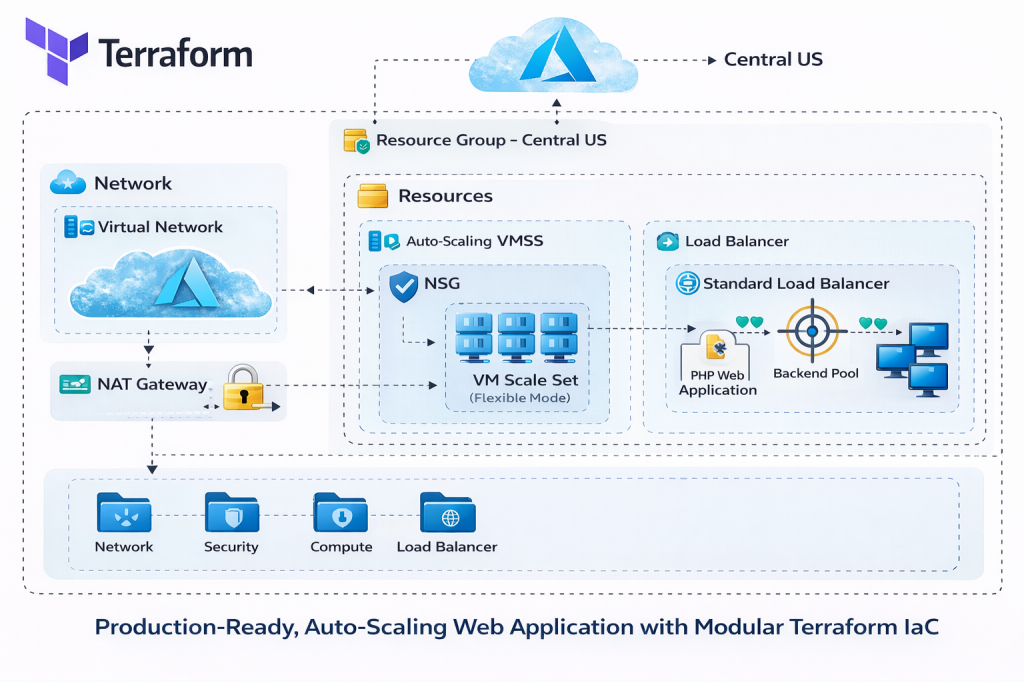
At the core of this project tutorial is a fully automated, auto-scaling Azure web application, deployed end-to-end using modular Terraform Infrastructure as Code.
The architecture consists of:
-
Azure Virtual Network (VNet) providing network isolation
-
Subnet isolation separating compute resources from other network layers
-
Network Security Groups (NSGs) enforcing least-privilege access
-
NAT Gateway ensuring secure and predictable outbound internet traffic
-
Standard Load Balancer distributing inbound traffic
-
Azure VM Scale Set (Flexible Mode) enabling horizontal scaling and fault tolerance
-
PHP Web Application, bootstrapped automatically using cloud-init on each VM
Design decisions emphasize fault tolerance, horizontal scalability, and clear separation of concerns. Each layer of the stack has a single responsibility, making the system easier to reason about, troubleshoot, and extend.
Design decisions focused on fault tolerance, scalability, and clean separation of concerns. Each layer of the architecture has a clearly defined responsibility, reducing blast radius and simplifying troubleshooting.
Project Structure: Modular Terraform Layout
Rather than placing resources in one file, the infrastructure is organized into purpose-built Terraform modules. Each module represents a logical responsibility within the system.
High-Level Structure
-
modules/network– networking and outbound connectivity -
modules/security– network security and governance controls -
modules/loadbalancer– traffic distribution and health checks -
modules/compute– VM Scale Set and auto-scaling logic -
environments/prod– environment-specific configuration and orchestration
Each module exists to encapsulate responsibility, not just to group files. This approach allows teams to change one part of the system without unintentionally impacting others.
Each module exists to solve a specific problem, not just to group files.
-
The network module owns connectivity and IP design
-
The security module enforces access rules and governance controls
-
The compute module manages scalable workloads
-
The load balancer module controls traffic distribution
-
The environment layer wires everything together for production
This structure makes the codebase easier to reason about, safer to change, and reusable across environments.
 Video Walkthrough
What I Demonstrated in the Video
This project tutorial is fully broken down in the accompanying video walkthrough.
⚙️ Azure VM Scale Set (Flexible Mode)
-
Auto-scales based on load
-
Fault-tolerant and zone-aware
-
cloud-init boots each VM with the full web stack
🌐 Standard Load Balancer
-
Distributes traffic across VMSS instances
-
Health probes and backend pool configuration
🔒 Network Security
-
VNet and subnet isolation
-
NSG enforcing least-privilege rules
-
NAT Gateway for predictable outbound traffic
Terraform Best Practices Applied
Several production-grade Terraform practices are applied throughout the project:
-
Modular structure for scalability and reuse
-
Variables and locals to enforce DRY patterns
-
Variable validation to prevent invalid inputs
-
Version pinning for Terraform and providers to ensure stability
-
Remote backend using Azure Blob Storage for state management
-
Consistent naming and tagging standards for governance and cost control
These practices reduce risk, improve collaboration, and make infrastructure safer to evolve over time.
Source Code and Repository
The complete Terraform configuration used in this lab is available on GitHub.
💡 Tip: Clone the repository before starting the lab so you can follow along step by step and experiment safely in your own Azure subscription.
The repository includes:
-
Modular Terraform code for networking, security, load balancing, and compute
-
VM Scale Set configuration with auto-scaling
-
cloud-init scripts for application bootstrapping
-
Remote backend configuration using Azure Blob Storage
-
Environment-specific variables and outputs
👉 GitHub Repository:
https://github.com/sirhumble07/azure-vmss-load-balanced-scalable-webapp-terraformReviewing the repository alongside this tutorial will help you understand how the modules fit together and how production-ready Terraform projects are structured in practice.
Deployment Walkthrough
Deployment follows the standard Terraform lifecycle:
-
terraform initinitializes providers and the remote backend -
terraform planpreviews changes before anything is applied -
terraform applyprovisions the full environment
Once deployed, scaling behavior can be observed under load, and resources can be validated directly in the Azure Portal to confirm correct configuration.
Cleanup and Cost Control
Labs should always be designed with teardown in mind.
Safe Teardown
terraform destroy cleanly removes all managed resources, ensuring no orphaned infrastructure remains.
Cost Governance Mindset
Destroying unused environments reinforces cost awareness, an essential habit in production cloud engineering. Technical excellence includes both correctness and financial responsibility.